Benchmarking Agentgateway vs LiteLLM's Rust Mode
A head-to-head proxy benchmark comparing agentgateway and LiteLLM's Rust mode on throughput, latency, CPU, and memory using Fortio and a mock Anthropic backend.
Since I published my benchmark of agentgateway vs. LiteLLM (Part 1 and Part 2), I’ve received quite a few questions about LiteLLM’s newly added Rust mode. So I decided to compare its performance with agentgateway.
Rather than comparing features, I wanted to answer a simple question:
How much proxy overhead does LiteLLM’s Rust mode introduce compared with agentgateway?
Similar to my previous benchmarks, I wanted to measure:
- Throughput (QPS)
- Request latency
- CPU utilization
- Memory usage
The goal is to isolate the performance overhead introduced by each proxy.
Enable LiteLLM’s Rust mode
Following the LiteLLM Rust mode documentation, the recommended way to enable Rust mode is to add rust: true to the LiteLLM configuration.
At the time of this benchmark, Rust mode did not support the OpenAI API path I was using, so I switched to a mock Anthropic model. Here is the relevant LiteLLM configuration:
model_list:
  - model_name: claude-mock  # for test litellm rust
    litellm_params:
      model: anthropic/claude-3-5-haiku-20241022
      api_base: http://mock-server:8081  # Anthropic-style base
      api_key: dummy
      rust: true
I also made sure I was using the latest LiteLLM build available for the test, LiteLLM 1.98.0, which is newer than 1.94.0.
For the Anthropic benchmark, I used the /v1/messages API path, which was the supported path for the Rust mode configuration I tested.
I then manually verified that Rust mode was actually enabled for the requests used in the benchmark.
For example:
curl -sD - -o /dev/null http://127.0.0.1:4000/v1/messages \
  -H "Content-Type: application/json" \
  -d @payloads/req-anthropic-1024.json
The response included:
x-litellm-version: 1.98.0
x-litellm-rust: true
The x-litellm-rust: true header confirms that the request was handled by LiteLLM’s Rust mode.
Test setup
The benchmark uses a very simple architecture. A mock LLM server immediately returns a fixed response so the benchmark measures proxy overhead rather than model inference time.
I used Fortio to generate traffic against each gateway.
fortio (bt) ──► litellm(rust:true):4000 ──┐
                                          ├──► mock-server (hyper-server) :8081
fortio (bt) ──► agentgateway:4001 ────────┘
Follow the benchmark instructions to update the LiteLLM and agentgateway configurations for Anthropic and generate the corresponding request and response payloads.
Max throughput benchmark
I first ran the benchmark using the default configuration while specifying the Anthropic API format:
./scripts/run-benchmark.sh -a anthropicThe benchmark uses:
- API: Anthropic
POST /v1/messages(both gateways) - LiteLLM:
rust: true, 2 workers, image with 1.98.0 - agentgateway: anthropic provider → mock
- Load: 32 connections, max QPS for 3 seconds
- Request payload: ~1.1 KB
Throughput & Latency
| Gateway | Throughput | P50 | P90 | P99 |
|---|---|---|---|---|
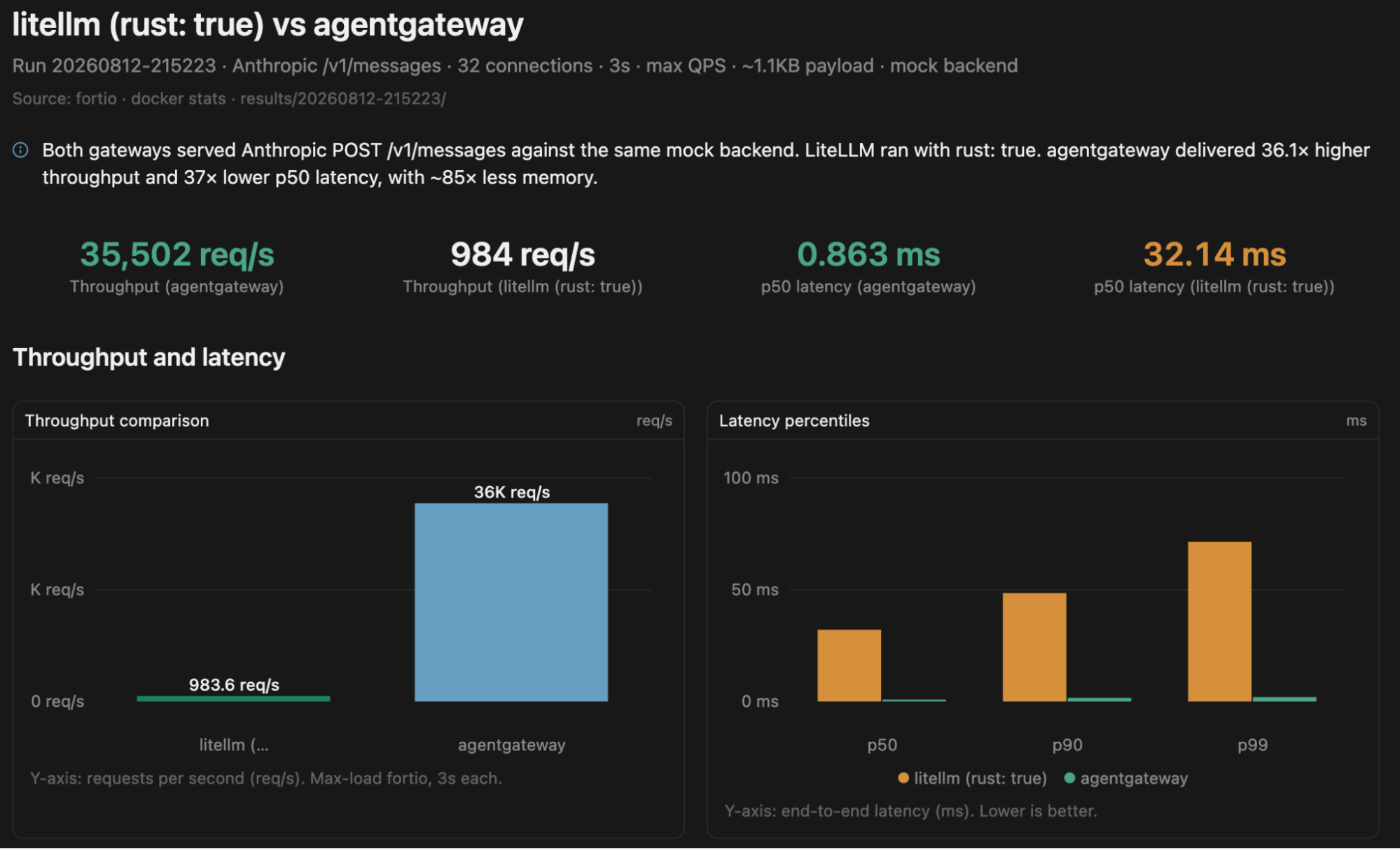
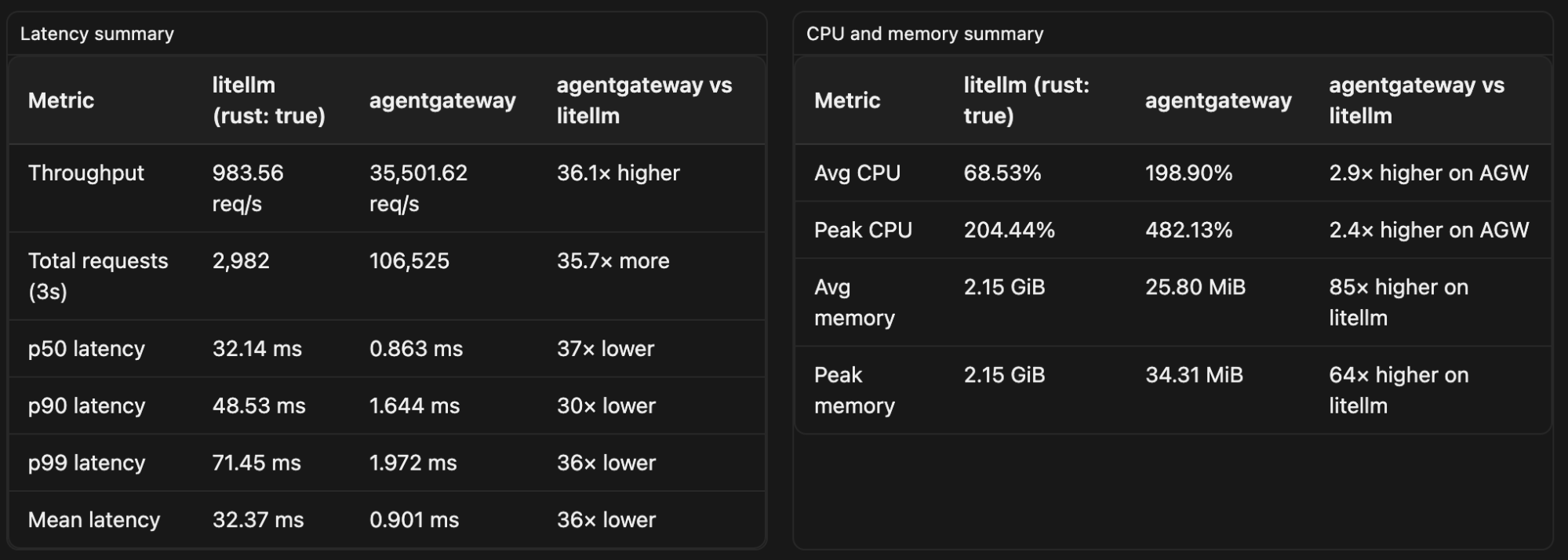
| agentgateway | 35,502 QPS | 0.863 ms | 1.644 ms | 1.972 ms |
| LiteLLM (rust: true) | 984 QPS | 32.139 ms | 48.528 ms | 71.451 ms |
agentgateway handled over 36× more requests per second while maintaining sub-2 ms P99 latency.
CPU & Memory
| Gateway | Avg CPU | Peak CPU | Avg Memory | Peak Memory |
|---|---|---|---|---|
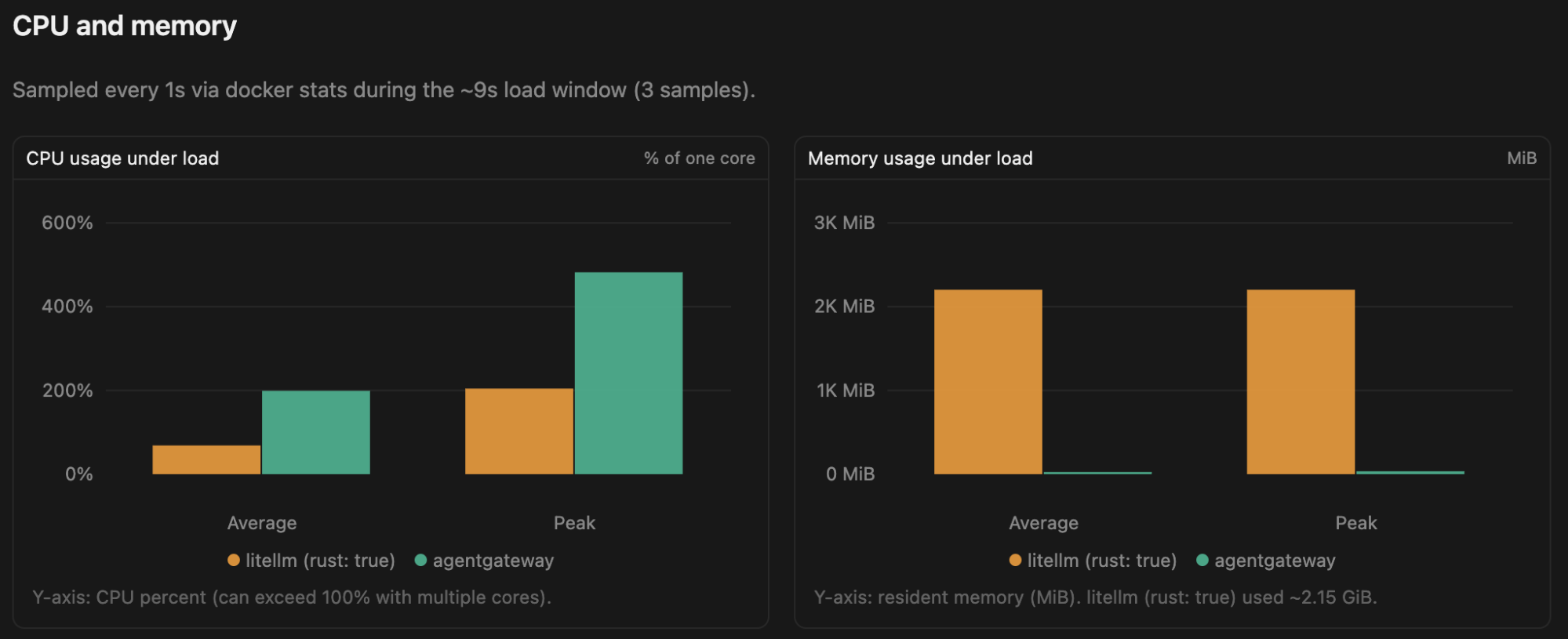
| agentgateway | 199% | 482% | 26 MB | 34 MB |
| LiteLLM (rust: true) | 69% | 204% | 2.15 GB | 2.15 GB |
Raw benchmark output
==> Run ID: 20260812-215223
==> LiteLLM workers: 2
==> API format: anthropic
==> Checking LiteLLM Rust header
    x-litellm-rust: true
...
Running fortio to litellm at 0 QPS for 3s and 32 connections...
qps: 983.56qps     p50: 32.139ms    p90: 48.528ms    p99: 71.451ms
Running fortio to agentgateway at 0 QPS for 3s and 32 connections...
qps: 35501.62qps   p50: 0.863ms     p90: 1.644ms     p99: 1.972ms

DEST,CLIENT,QPS,CONS,DUR,PAYLOAD,SUCCESS,THROUGHPUT,P50,P90,P99
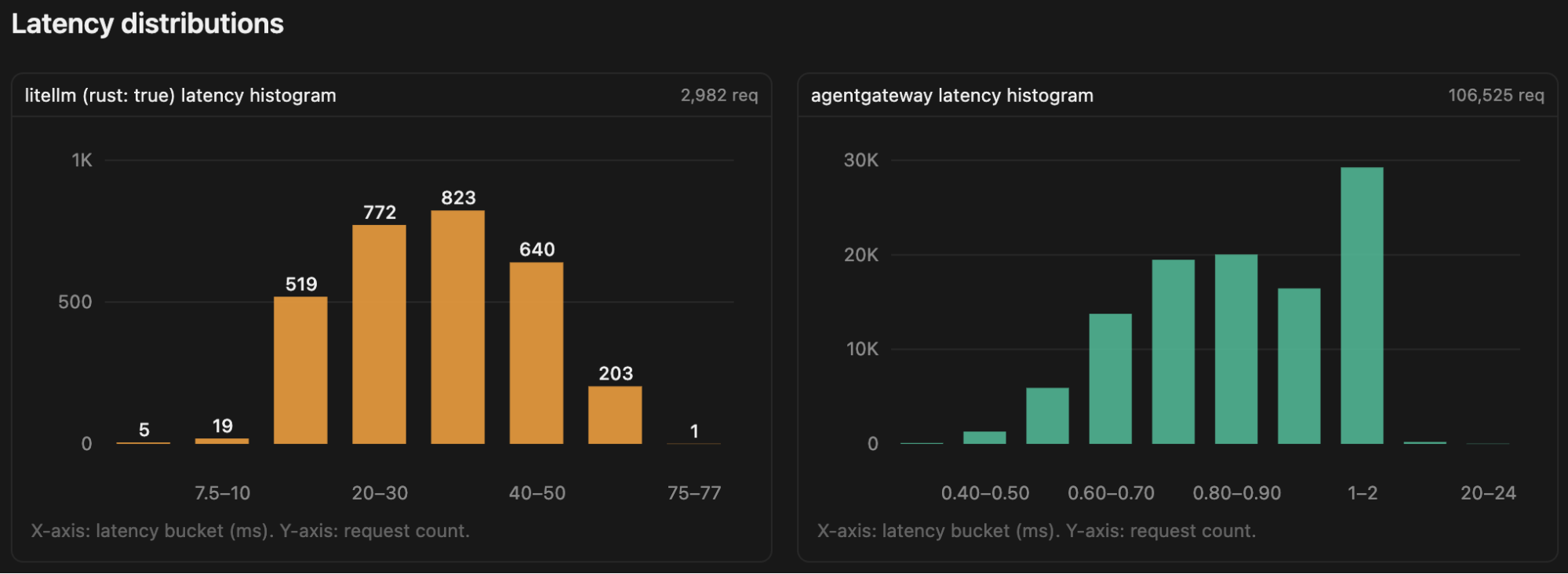
litellm,fortio,0,32,3,1114,2982,983.56qps,32.139ms,48.528ms,71.451ms
agentgateway,fortio,0,32,3,1114,106525,35501.62qps,0.863ms,1.644ms,1.972ms

==> CPU / memory
PAYLOAD  CONTAINER           SAMPLES  AVG_CPU%  PEAK_CPU%  AVG_MEM   PEAK_MEM
1024     perf-agentgateway   3        198.90%   482.13%    25.80MiB  34.31MiB
1024     perf-litellm        3        68.53%    204.44%    2.15GiB   2.15GiB
1024     perf-mock-server    3        18.18%    52.30%     3.05MiB   3.56MiB

==> Checking LiteLLM Rust header
    x-litellm-rust: true
Full results: github.com/linsun/litellm-agw-perf/results/20260812-215223
Visualized results
I asked Cursor to turn the raw benchmark data into charts:
Fixed throughput benchmark
Maximum-throughput tests show the upper limit of each gateway, but they don’t provide an apples-to-apples comparison at the same request rate.
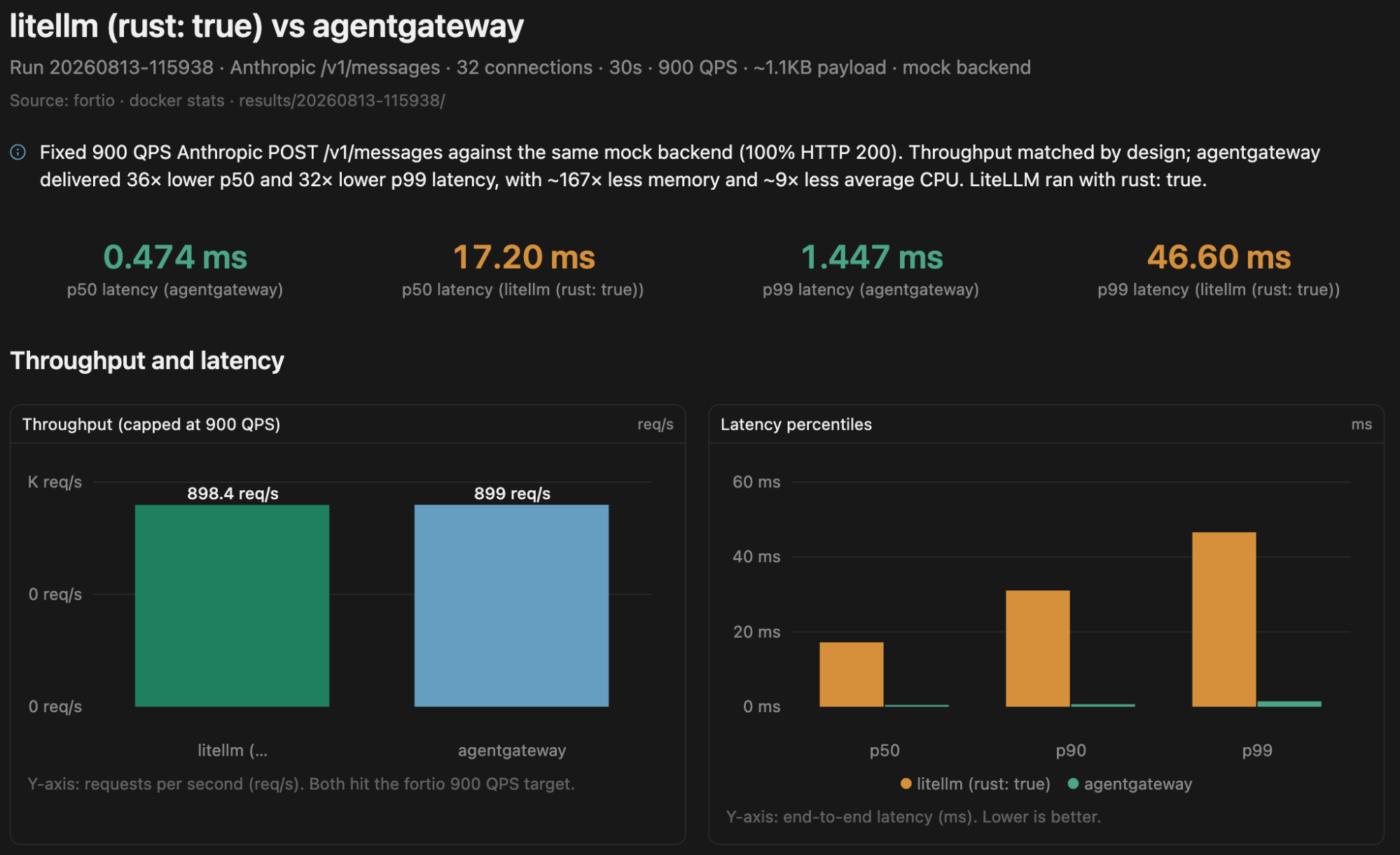
Since LiteLLM reached approximately 983 QPS in the maximum-throughput test, I ran a second benchmark at a fixed target of 900 QPS.
./scripts/run-benchmark.sh -a anthropic -q 900 -d 30The benchmark uses:
- API: Anthropic
POST /v1/messages(both gateways) - LiteLLM:
rust: true, 2 workers, image with 1.98.0 - agentgateway: anthropic provider → mock
- Load: 32 connections, target throughput 900 QPS for 30 seconds
- Request payload: ~1.1 KB
Throughput & Latency
| Gateway | Actual Throughput | P50 | P90 | P99 |
|---|---|---|---|---|
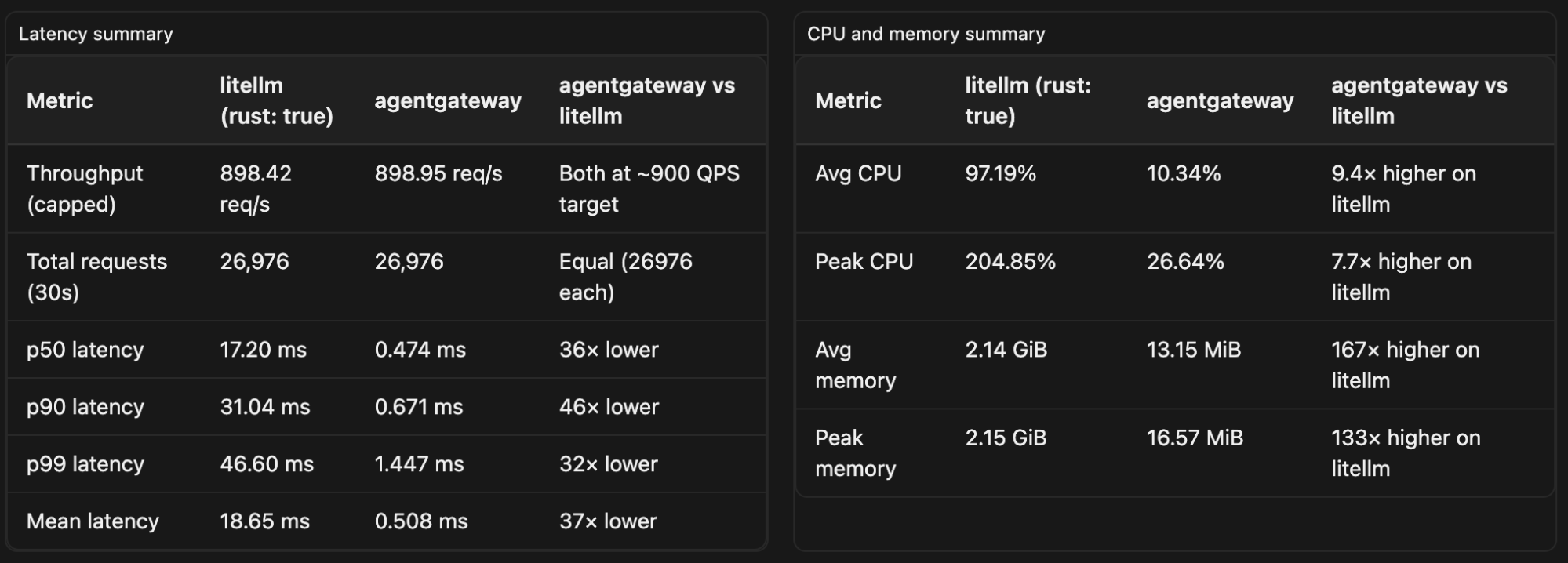
| agentgateway | 898.95 QPS | 0.474 ms | 0.671 ms | 1.447 ms |
| LiteLLM (rust: true) | 898.42 QPS | 17.200 ms | 31.040 ms | 46.598 ms |
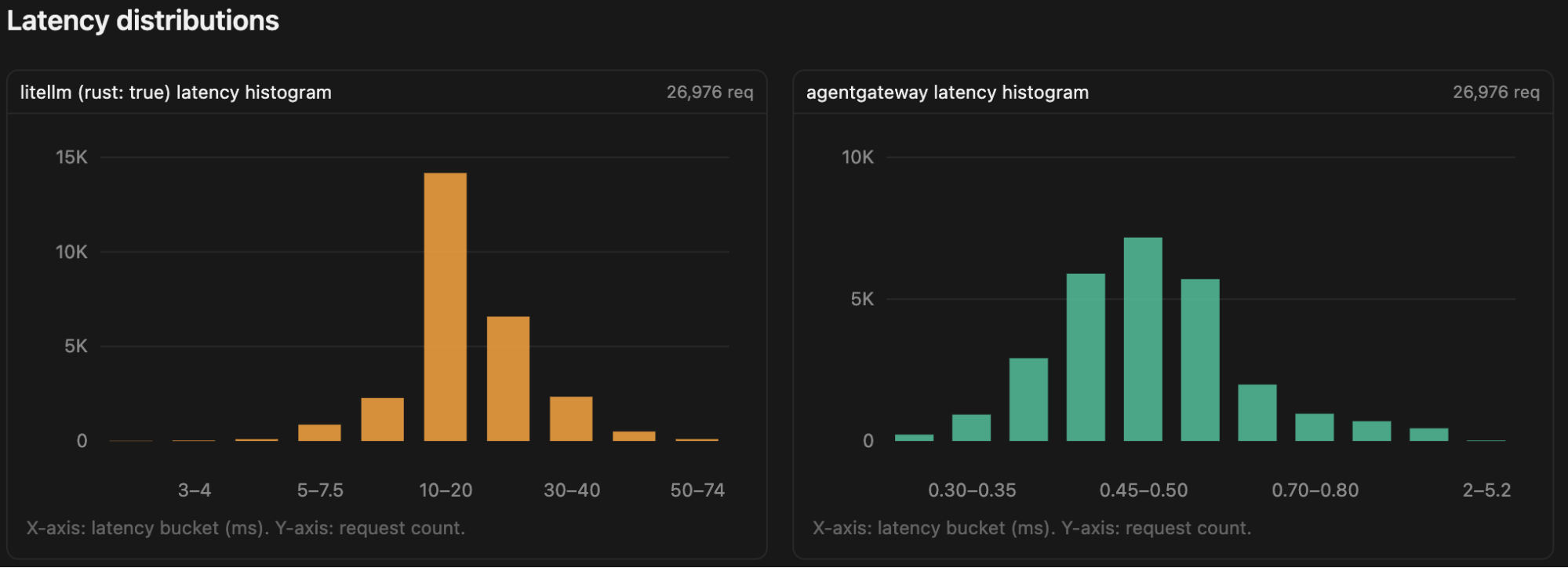
Both gateways sustained the target rate. Latency remained dramatically different: agentgateway’s P99 was 1.45 ms versus 46.60 ms for LiteLLM.
CPU & Memory
| Gateway | Avg CPU | Peak CPU | Avg Memory | Peak Memory |
|---|---|---|---|---|
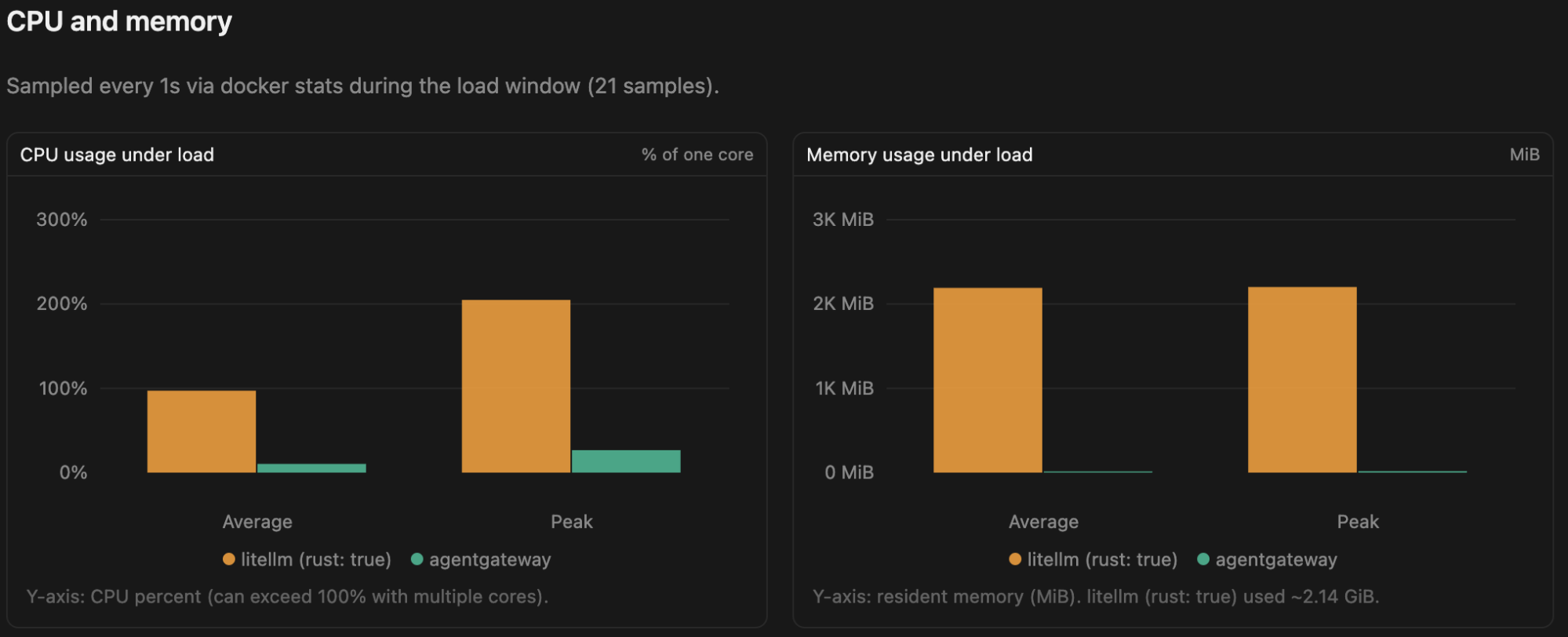
| agentgateway | 10.3% | 26.6% | 13 MiB | 17 MiB |
| LiteLLM (rust: true) | 97.2% | 204.9% | 2.14 GiB | 2.15 GiB |
Raw benchmark output
./scripts/run-benchmark.sh -a anthropic -q 900 -d 30
==> Run ID: 20260813-115938
==> LiteLLM workers: 2
==> API format: anthropic
==> Checking LiteLLM Rust header
    x-litellm-rust: true
...
Running fortio to litellm at 900 QPS for 30s and 32 connections...
qps: 898.42qps     p50: 17.200ms    p90: 31.040ms    p99: 46.598ms
Running fortio to agentgateway at 900 QPS for 30s and 32 connections...
qps: 898.95qps     p50: 0.474ms     p90: 0.671ms     p99: 1.447ms

DEST,CLIENT,QPS,CONS,DUR,PAYLOAD,SUCCESS,THROUGHPUT,P50,P90,P99
litellm,fortio,900,32,30,1114,26976,898.42qps,17.200ms,31.040ms,46.598ms
agentgateway,fortio,900,32,30,1114,26976,898.95qps,0.474ms,0.671ms,1.447ms

==> CPU / memory
PAYLOAD  CONTAINER           SAMPLES  AVG_CPU%  PEAK_CPU%  AVG_MEM   PEAK_MEM
1024     perf-agentgateway   21       10.34%    26.64%     13.15MiB  16.57MiB
1024     perf-litellm        21       97.19%    204.85%    2.14GiB   2.15GiB
1024     perf-mock-server    21       2.70%     4.23%      2.08MiB   2.24MiB
Full results: github.com/linsun/litellm-agw-perf/results/20260813-115938
Visualized results
Takeaways
For this benchmark, agentgateway introduced significantly less proxy overhead than LiteLLM’s Rust mode.
At maximum throughput, agentgateway delivered approximately:
- ~36× higher throughput
- Much lower (~30×) latency across all percentiles
- 85× lower memory usage on average
- 2.9× higher CPU while serving 36× higher throughput
At a fixed 900 QPS:
- Both agentgateway and LiteLLM sustained the full target throughput.
- P99 latency was 1.45 ms for agentgateway versus 46.60 ms for LiteLLM.
- agentgateway used approximately 9× less CPU on average.
- agentgateway used approximately 160× less memory.
The key point is that the difference isn’t simply about maximum throughput. Even when both gateways are handling the same 900 QPS workload, the proxy overhead is substantially different, particularly in latency and memory consumption.
This benchmark intentionally isolates proxy performance by using a mock backend, so it doesn’t measure real LLM inference latency or feature completeness. If your workload is dominated by model inference, the differences will be less noticeable. However, if you’re building high-throughput AI services or running a local gateway that handles many concurrent requests, proxy overhead becomes much more important.
The complete benchmark scripts, configurations, and raw results are available in the GitHub repository.
If you’d like to reproduce the numbers yourself, follow the instructions in the repository to run both the maximum-throughput and fixed-throughput benchmarks.